Growblog Actions: Prioritized Fixes for Your Ghost Blog ⚡️
New Actions report in Growblog: prioritized SEO fixes, broken links, keyword checks & content ideas for Ghost blogs, ranked by impact using your last 30 days of data.

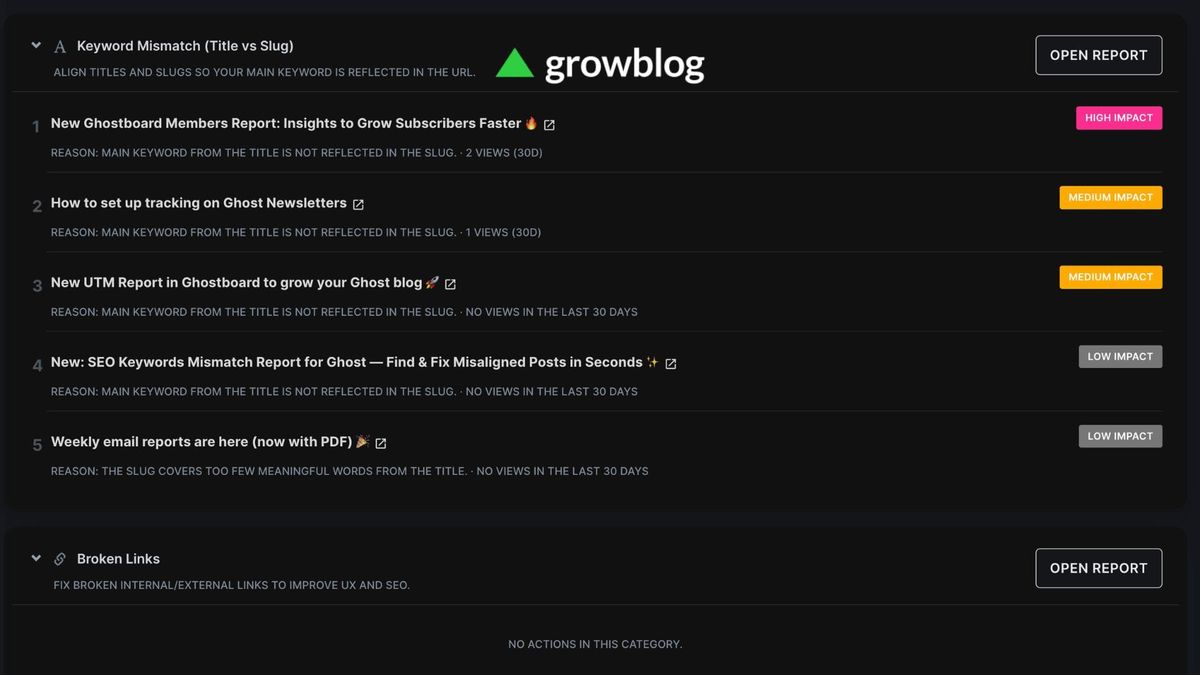
If you run a Ghost blog, you already juggle writing, publishing, SEO, and growth. The hard part isn’t having data, it’s knowing what to fix first.
Today, Growblog makes that easier with a new dashboard report built for busy creators:
✅ Actions: a prioritized checklist of improvements for your Ghost site, grouped by topic and ranked by estimated impact using your last 30 days of traffic.
This isn’t another wall of charts. It’s a short list of “do this next” items, so you spend your limited time where it moves the needle.
Let’s break down what it is, why it matters for growth, and how to use it week after week.
🎯 Why “what should I fix first?” is a growth problem
Most blogs don’t fail because of one big mistake. They stall because of many small leaks:
- Broken links that frustrate readers (and search engines)
- Titles and URLs that don’t match the topic you’re trying to rank for
- Missing meta descriptions, weak slugs, or posts that get traffic but almost no reading time
- Topics that already perform well but you haven’t published enough around them
You could hunt for these issues manually. But that’s slow and easy to postpone.
Actions exists to answer one question, fast:
“If I only have 30 minutes this week, what should I touch on my Ghost blog?”
👀 What is the Actions report?
Actions lives in your Growblog dashboard (in the sidebar, under Sync). It pulls together signals you already care about SEO, links, images, keywords, and content performance, into clear sections you can expand or collapse.
Each section has:
- A short explanation of why it matters
- A list of specific items to review (not vague advice)
- An impact label (High / Medium / Low) so you can compare items inside that section
- An Open report button that jumps to the full Growblog report for deeper detail (links, images, SEO, etc.)
You can also change how many items you see per section (for example 5, 10, 25, or 50) when you want a quick scan or a deeper review.
Why 30 days?
Growth is a moving target. Actions uses a rolling 30-day window (based on your archived post-level traffic) so recommendations stay relevant to recent reader behavior, not something that was true six months ago.
🧩 What you’ll see inside Actions (and why each block helps growth)
Here’s the logic in plain English: search and reader trust first, quick SEO wins next, quality and opportunity after that.
1) Keyword mismatch (title vs slug)
Search engines and humans both use your URL to understand what a page is about. If your title promises one topic but your slug looks like something else, you create friction for readers and for SEO clarity.
Actions surfaces posts where the title and slug look misaligned, with a short reason (in human language) and context from recent views when available.
What to do: Pick the top items, open the post in Ghost, and align title, slug, and intent, without stuffing keywords. One clear main topic beats ten vague words.
2) Broken links
Broken links are a classic “silent” problem: they hurt user experience, waste crawl budget, and make your site feel less trustworthy.
Actions highlights broken internal and external targets and helps you prioritize what to fix first within the list.
What to do: Fix internals first (they’re fully in your control), then decide which external links to update, replace, or remove.
3) SEO basics
This section bundles practical issues Growblog already detects things like:
- Missing meta descriptions
- Missing featured images
- Titles or URLs that are too long
- Very short posts
- Images missing alt text
- Tag usage that’s off (none, or too many)
- Invalid slugs
These aren’t “ranking hacks.” They’re hygiene, and hygiene compounds when you have real traffic.
What to do: Treat this as a weekly cleanup: fix a handful of items, starting with pages that actually get visits.
4) Broken images
Images that don’t load hurt trust, readability, and perceived quality, especially on share previews and long guides.
Actions points you to broken image targets so you can repair or replace them without manually clicking through your whole archive.
5) Topics to write more about
Growth isn’t only “fix what’s broken.” It’s also doubling down on what already works.
This block looks at tags/topics that earned meaningful traffic recently across relatively few posts, a simple signal that readers want more in that area.
What to do: Turn one topic into a mini content plan: one deep guide, one update to an old post, one FAQ-style article, whatever fits your audience.
6) Content improvements
Here you’ll find two useful patterns:
- High traffic, low engagement (for example, lots of views but weak scroll depth). A hint the promise of the title doesn’t match the delivery, or the page is hard to read.
- No recent traffic on posts that might deserve a refresh, merge, redirect, or archive decision.
What to do: Rewrite intros, tighten structure, add examples, split long posts, or consolidate duplicates. Small edits can unlock big gains when the URL already gets attention.
🧠 How impact labels work (without overthinking them)
Impact in Actions is designed for comparison inside each section, not as a perfect global score.
Think of it like this:
- High = top priority within that category right now
- Medium = still worth doing soon
- Low = still useful, but likely less urgent relative to the rest of the list
That’s why you shouldn’t stress if everything feels “relative.” The goal is ordering your work, not chasing a fake precision metric.
📅 A simple weekly workflow (15–30 minutes)
If you want a repeatable habit, try this:
- Open Actions once a week.
- Pick one item from Keyword mismatch or Broken links (these tend to affect trust and clarity fast).
- Fix 2–3 items from SEO basics on pages that actually get traffic.
- If you’re planning content, grab one topic from Topics to write more about and outline a new post in Ghost.
Small weekly wins beat a “perfect quarterly audit” you never finish.
✅ Who gets the most value from Actions?
Actions is especially helpful if you:
- Publish on Ghost regularly and don’t want to babysit SEO spreadsheets
- Want a prioritized queue instead of dozens of disconnected reports
- Care about reader experience (links, images, clarity) and growth
- Run a solo blog or a small team with limited time
If you’re just starting and traffic is near zero, some sections will look quiet, that’s normal. As traffic grows, Actions becomes more opinionated (in a good way).
❤️ Final thoughts
Growing a Ghost blog isn’t about doing everything. It’s about doing the next right things: the fixes that remove friction, sharpen your SEO story, and point your writing toward demand you already have.
Growblog’s Actions report is built for that reality: less guessing, clearer priorities, faster progress.
Open your dashboard → Actions → pick one fix → ship it in Ghost → repeat.
Your future archive will thank you. ⚡
Grow your Ghost blog audience faster 🚀
Start your free trial now and explore all Ghostboard features for free. No credit card is required.